Usage
Main screen
On launch, claudectl shows all projects Claude Code has ever opened, sorted by most recently used.
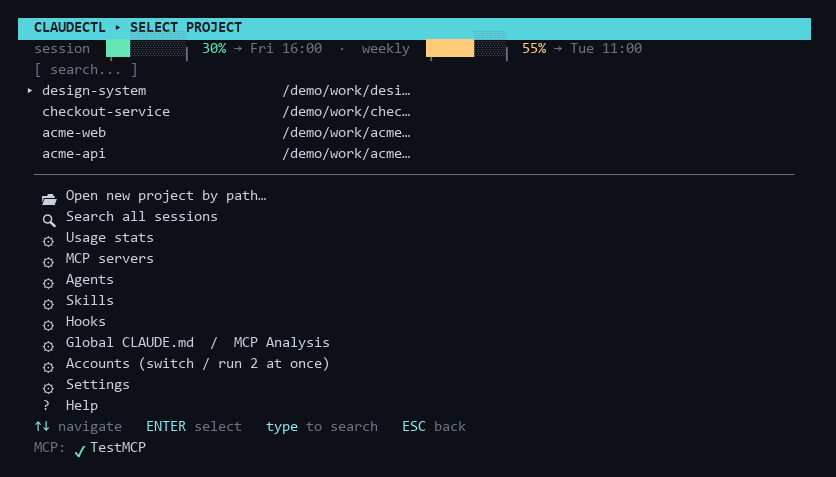
- Quick-resume items appear at the top (★ = most recent session, ☆ = older sessions). These are the 5 most recently used sessions across all projects; selecting one resumes that exact session without navigating into the project's list.
- All other projects follow, sorted by recency — type to filter live
- The MCP status footer shows connected MCP servers once the background check completes
- Bottom menu: 🔍 Search all sessions, 📦 Hide / restore projects, ⚙ Usage stats, ⚙ MCP servers, ⚙ Agents, ⚙ Hooks, ⚙ Global CLAUDE.md, ⚙ Settings, ? Help
Built-in screens
🔍 Search all sessions — indexes session names, AI titles, and previews across every project (cached — instant after the first scan). Type to filter, ENTER resumes the selected session directly, no matter which project it belongs to.
⚙ Usage stats — per-project table of sessions, messages, tokens (in / out / cache) and estimated API-equivalent cost, parsed from local transcripts. ENTER drills into per-session rows. Costs are estimates at published API rates — useful as a value/consumption gauge if you're on a subscription plan. First scan shows progress and can be stopped with ESC (partial results); later opens are instant thanks to a persistent cache.
📦 Hide / restore projects — takes a project out of the project list and out of the GUI sidebar, for the folders you never want to launch from again. ENTER toggles the row under the cursor. It is a view flag, not an archive: nothing on disk moves, the project's sessions stay resumable, and restoring is one keypress. The main screen says how many rows are being filtered; in the GUI a project page has a Hide button and the sidebar grows a Show N hidden projects button while any are hidden.
⚙ Global CLAUDE.md / MCP Analysis — lists all connected MCP servers; select one to run
Claude with a prompt that calls the MCP's tools/list endpoint and formats the result as
markdown, written into ~/.claude/CLAUDE.md inside a per-server sentinel block (cleanly
re-updatable). You can also open the global CLAUDE.md directly in your editor from this
menu. See Global CLAUDE.md.
Notifications
A desktop notification — Windows toast, macOS notification centre, notify-send on Linux —
when a background job that ran longer than 20 seconds finishes, and when the detached
memory worker is done. That worker is the reason this exists: it runs headless, outlives
the screen that started it, and had no way to tell anyone it had finished. Quick jobs never
notify. ⚙ Settings → Notifications turns it off.
Loops
Two kinds, because Claude Code only offers one.
In a session
/loop re-runs a prompt inside a session — polling a deploy, babysitting a PR, working
through a maintenance pass. Its tasks are session-scoped: they fire only while that
session is open and idle, expire after seven days, and a fresh conversation clears them.
claudectl starts one by opening a session whose first typed message is
/loop [interval] [prompt] (with the project's usual account, agents, skills and system
prompt), watches it through that session's own transcript — each iteration is a turn —
and ends it by closing the session, because from outside the session there is no other
lever. Interval and prompt are both optional and each combination means something
different: both is a fixed schedule, prompt alone lets Claude choose the delay each time,
neither runs your loop.md.
In the background
For work that should carry on with claudectl closed and no session open, claudectl
registers an entry in your OS scheduler — Task Scheduler on Windows, cron elsewhere —
that runs headless claude -p on the interval, in the project, under the account you pick.
This is claudectl doing locally what Claude Code's own comparison table calls a Desktop
scheduled task.
Because it runs unattended, it carries its guardrails in the runner rather than the UI:
- A permission mode you choose.
claude -pstarts in Manual mode, so an unattended run does nothing unless it is told what it may do —auto(a classifier reviews each action),acceptEdits(writes files; shell and network still gated) ordontAsk(reports, never changes). The board shows which one each loop is running under. - A 7-day expiry, the same bound Claude Code puts on its own scheduled tasks, enforced by the scheduled run itself: past it, the task removes itself. Renew pushes it out.
- Your per-call budget cap (
Settings → Budget cap) on every run, and the cost of the last run on every row. - Nothing silent. A failed run raises a desktop notification; the board keeps a log of the last twenty runs with their cost and one-line outcome.
Each run is a fresh session — resuming one forever would grow its context and its cost
without bound. What makes it a loop rather than a repeated one-shot is a rolling record:
after every run claudectl rewrites a CLAUDECTL:LOOP block in the project's CLAUDE.md
with the last five outcomes, so the next run starts knowing what the previous ones did. It
is rewritten, never appended, so it cannot grow.
Stop removes the scheduler entry, which is exact: it cannot fire again.
loop.md
The prompt a bare /loop runs, and what a background loop runs when you leave the prompt
empty: <project>/.claude/loop.md wins over <account>/loop.md. Both are edited on the
same page, with Build with AI to draft one (you approve the text before it is written).
Edits apply from the next iteration.
Key bindings
Main screen (project list)
| Key | Action |
|---|---|
| ↑ / ↓ | Navigate |
| ENTER | Select project / resume / open menu item |
| Type text | Filter projects live |
| ESC | Clear filter, then exit |
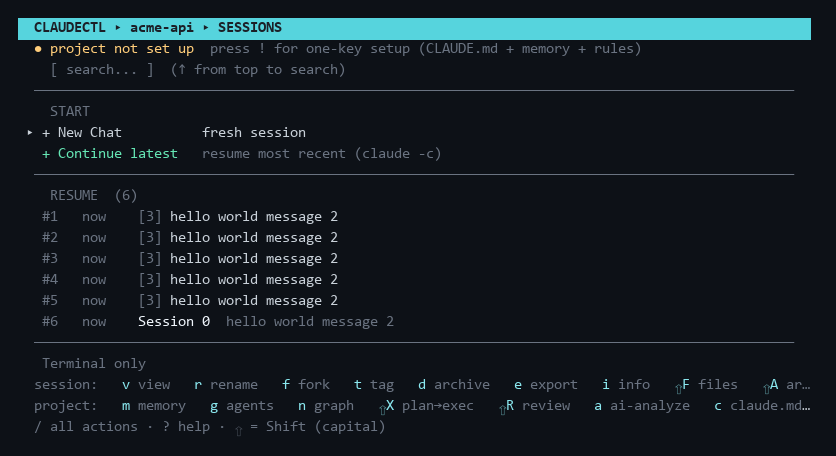
Sessions screen (session list for a project)
| Key | Action |
|---|---|
| ↑ / ↓ | Navigate |
| ENTER | Select / confirm |
| ESC | Back / cancel (clears filter first if active) |
| r | Rename session |
| d | Archive or delete session |
| f | Fork session |
| v | View transcript |
| e | Export transcript to markdown |
| i | Session info (tokens, cost, models, branch) |
| F | Changed files (from session tool calls) |
| t | Tag session |
| u | Project usage stats |
| m | Memory hub (build · ask · preview injection · lessons · toggles) |
| L | Lessons review (approve / pin / evict session learnings) |
| / | Action palette — every action, type-to-filter |
| ! | One-key project setup (first open: CLAUDE.md + memory + rules) |
| M | Memory map (CLAUDE.md hierarchy) |
| A | Toggle archived sessions view |
| c | Scaffold CLAUDE.md (git + sessions) |
| a | AI-generate CLAUDE.md (Claude CLI) |
| s | Edit / generate system prompt |
| g | Pick project agents (library checklist → .claude/agents/) |
| n | Architecture graph + project memory screen (then o open graph · m build memory · a ask · r rebuild) |
| w | Workspace status (provenance & freshness) |
| ⇧K | New chat seeded with context from another session, any account (hand-off) |
| ⇧W | Context weight audit — token cost of everything auto-loaded per turn |
| ⇧C | Compress CLAUDE.md with AI (cut per-turn tokens) |
| ⇧X | Plan → Execute (plan on one model, execute on another) |
| ⇧R | Code review of the working diff |
| p | Manage extra PATH entries |
| x | Manage --add-dir directories |
| ? | Help / keyboard reference |
| BACKSPACE | Delete last filter character |
| Type text | Filter sessions live by name or preview |
Transcript viewer (v)
| Key | Action |
|---|---|
| ↑ / ↓ | Scroll line by line |
| ← / → / SPACE | Page up / down |
| / | Search inside the conversation |
| n / p | Jump to next / previous match (wraps) |
| i | Toggle session info header (tokens, cost, models, branch) |
| e | Export to markdown |
| ESC | Clear search, then exit |
The footer shows your position as msg N/M — counting conversation messages, not raw lines.
Launch options screen
| Key | Action |
|---|---|
| ↑ / ↓ | Switch fields (Effort / Model / Permissions / Lead agent / Account / Think cap / Subagents / Worktree / Name) |
| ← / → | Cycle values; edit Name/Worktree |
| e | Economy preset (Sonnet · 8k thinking cap · Haiku subagents) |
| ENTER | Launch with selected options |
| ESC | Back to main menu (no launch) |
Worktree & Name appear only for new sessions; Lead agent appears when ~/.claude/agents/
has agents; Account appears when you've added extra accounts. Think cap sets
MAX_THINKING_TOKENS and Subagents sets CLAUDE_CODE_SUBAGENT_MODEL for the launched
session. Project agents picked with g are shown read-only here.
Multi-select / confirm
- Checkbox pickers (MCP tools, agent tools):
SPACEtoggle,aall,nnone,vview (agent.md, where available),ENTERconfirm,ESCcancel. - Confirm dialogs:
←→choose,ENTERconfirm,ESC/y/n.
Command line
| Command | What it does |
|---|---|
claudectl |
Open the TUI (or the GUI, if ui_mode is set to gui) |
claudectl --help |
Every command, what the tool does, and where its state lives |
claudectl --version |
The installed claudectl version |
claudectl --gui / --tui |
Force one interface for this run, ignoring the setting |
claudectl workspace status |
Freshness report for the repo in the current directory |
claudectl recall "<topic>" |
Print the task-relevant subgraph of this project's memory |
claudectl review [--staged\|--branch] |
Review the working diff, staged diff, or the whole branch |
claudectl sync-accounts [--yes\|--dry-run] |
Level every account up to what you have provisioned |
claudectl statusline |
Render one status line from the JSON payload on stdin |
claudectl --failover-serve [port] |
Run the model-failover proxy in the foreground |
claudectl --failover-stop |
Terminate the failover daemon named in the lock file |
python -m claude_sessions <same args> works identically and is what the installed status
line and the background memory worker use.
The desktop GUI has the same operations as every screen above.